Check Traffic eChallan Status Online
Get Violation Details, Fine Amount, Due Date, Paid and Unpaid Status.


What isTraffic eChallan?
What is Traffic eChallan?
The Traffic eChallan is the paperless version of the traditional fine slip, issued electronically by traffic authorities for violations like speeding, illegal parking, or signal jumping. With this system, you can check challan status, view eChallan details, and pay fines instantly, no more waiting in line or handling paperwork.
This online challan check portal makes it simple to stay on top of your driving record. As soon as an offense is recorded, your RTO challan shows up in your account. You can see what you owe in real time, complete a car challan check, and settle your dues securely from home. Whether it’s how to check challan online or a quick challan check online, the eChallan system keeps enforcement transparent and hassle-free.
Check & Pay
Instantly Check & ClearYour Traffic Fines From Any Device

Check using
MyMotor
Monitor and clear your traffic fines instantly from any device.
1
Open MyMotor
Go to the MyMotor website or launch the MyMotor app. Navigate to "Challan" tab in the menu for a seamless experience.
2
Enter your vehicle number
Type your license plate (e.g. KA03XY4567) into the search field and hit "Search"
3
Track your Challans
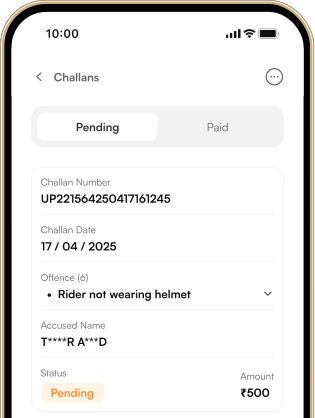
Instantly see each offense, fine amount, date of violation, accused name, and payment status, both pending and cleared.
Recommended

Check using
State Traffic Police Website
Visit your state's official traffic police website and:
1
Open the Official Portal
Navigate to your state's Traffic Police eChallan payment page.
2
Enter Vehicle or Notice Number
Fill in your registration plate or challan reference to view pending fines.
3
View Outstanding Fines
The system will list each violation, fine amount and status.
4
Proceed to Pay
Select the challan you want to clear and click the payment button.
5
Receive Instant Receipt
After payment, an SMS or email confirms your successful transaction.

Check using
Parivahan Portal
Visit the official government website and:
1
Visit the Parivahan eChallan Page
Go to vahan.parivahan.gov.in/eChallan
2
Login
Enter your registered mobile number or driving license details.
3
Retrieve Your Challans
Choose the specific challan, verify the offence details and amount due.
4
Make Payment
Pick your preferred option to pay and complete the transaction.
5
Get Confirmation
You'll get an SMS/email with transaction ID & e-receipt for your records.
Tips To Avoid Fines
Stay Fine Free, SmartWays To Avoid Traffic eChallans
Keep Your Vehicle In Shape
Schedule routine checks for headlights, brake lights, indicators, and emission systems. A well-maintained vehicle won't trigger defect-related penalties during spot inspections or automated scans.
Follow Signals and Signs
Always stop fully at red lights, yield where indicated, and stay within marked lanes. Observing road signs like one-way streets or school zones helps you avoid fines for signal jumping or wrong-way driving.
Check Your eChallan Regularly
Log into MyMotor regularly to review any new or unpaid fines. Early detection means you can clear dues online before late fees or additional penalties are applied.
Stay Updated On Rules
Traffic laws and fines can change by state or municipality. Subscribe to official RTO alerts or follow your local transport authority's updates so you're never surprised by a new regulation.
Wear Seatbelts and Helmets
Buckle up every time you drive a car, and always wear a certified helmet on two-wheelers. These basic safety requirements are common on-the-spot checks and carry hefty fines when ignored.
Drive Within Speed Limits
Automated speed cameras and patrol units enforce posted limit rigorously. Keep an eye on digital signboards and your car speedometer staying within limits prevents instant eChallan issuance and keeps you safe.

All Your Vehicle Reminders
In One App
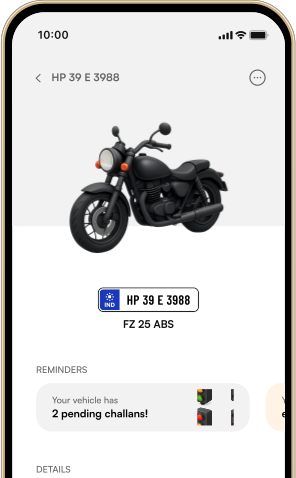
Get instant reminders for insurance expiry, PUCC validity, and pending challans, all in a single, easy-to-use app.